

MySQL HeatWave AutoML is a native automated machine learning engine tightly integrated with the MySQL HeatWave database. It enables model training, inference, scoring, and explainability through SQL, executing directly on data in InnoDB tables or in external accessed via HeatWave Lakehouse from Object Storage. By operating in-database and in-memory on HeatWave nodes, AutoML eliminates data extraction, external ML runtimes, and separate model-serving infrastructure.
MySQL HeatWave AutoML executes machine learning natively through SQL stored routines. The ML_TRAIN statement automates feature pre-processing, algorithm and feature selection, hyperparameter tuning, and final model training and evaluation by analysing the train dataset: data types, distributions, and feature relationship. These trained models then are used for inference via ML_PREDICT_TABLE applying learned feature patters to table or via ML_PREDICT_ROW for a JSON-formatted row. AutoML also provides in-database explainability with ML_EXPLAIN, exposing per-prediction feature contributions.
To assess model quality, AutoML provides ML_SCORE to calculate the desired scoring metric for data residing in a specified validation table. Operationally, ML_TRAIN is run occasionally to create a new ML model only when ML_SCORE shows prediction quality degrades below target percentage, otherwise the same ML model will continue to be used for inferencing.
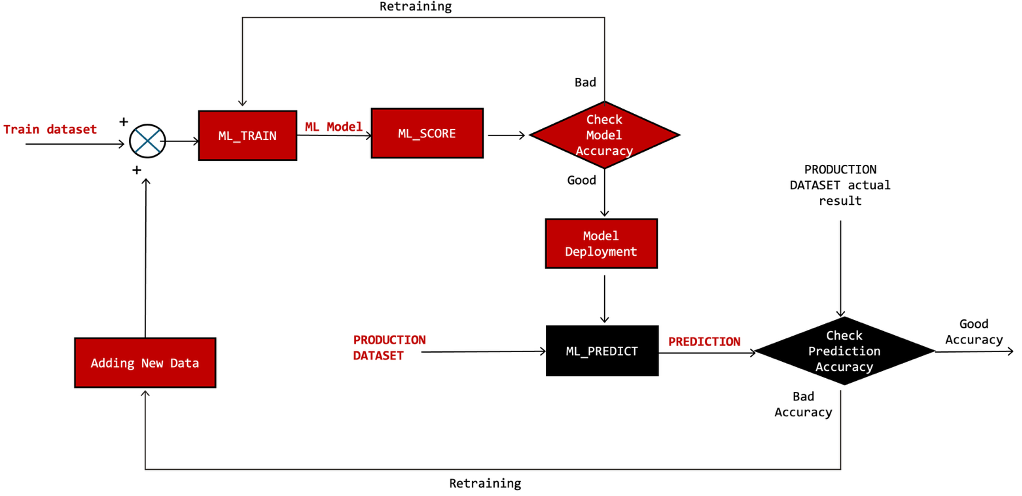
Fig-1. Simplified Machine Learning Ops. Diagram, if prediction accuracy is good, then the red boxes aren’t executed
Isolated Interim Architecture for ML Model Training
ML_TRAIN is a compute-intensive operation that may take extended period of time to complete training an ML model. To minimize training latency, HeatWave executes ML_TRAIN in parallel across the HeatWave cluster, consuming significant amount of ECPU and memory resources on each node. During training, these resources are exclusively allocated for ML and GenAI operations and some background activities. SQL queries offloaded to the RAPID engine are queued until ML_TRAIN completes. HeatWave still allows limited resource sharing with Generative AI workloads and other AutoML queries, capped at eight concurrent operations.
In contrast, ML_PREDICT_TABLE and ML_PREDICT_ROW perform inference by applying a pre-trained ML model to input data to compute predictions. These computations are lightweight in terms of ECPU and memory consumption and execute fairly quickly, and therefore can be interleaved with RAPID-offloaded online queries.
ML_TRAIN is an infrequent operation but each execution causes significant latency for the queued RAPID offloaded-querys. For this reason, ML_TRAIN must not be executed on a production HeatWave instance that is also used for analytics queries. The recommended architecture is to run ML_TRAIN on a dedicated interim MySQL HeatWave instance, provisioned exclusively for model training and brought online only when training or re-training is required. Upon completion, the trained ML model is exported and deployed to the production instance for inference. The interim instance can then be stopped to optimize infrastructure cost.
Moving forward in this blog
The following steps illustrate how to operationalize ML_TRAIN on a mission-critical system. This includes starting a HeatWave interim instance, copying training data from the production instance to the interim instance, executing ML_TRAIN on the interim instance, transferring the trained model back to the production instance, and stopping the interim instance to optimize resource usage and cost.
The discussion also covers handling the pseudo primary key requirement when running ML model and inference on production instance configured with MySQL HeatWave HA. Since Group Replication mandates that every table have a primary key, this constraint must be addressed to accurately execute both ML_TRAIN and ML_PREDICT_* operations since the pseudo primary key will need to be excluded for successful completion of these operations.
The Process Flow with an Example
This blog is based on the HeatWave AutoML exercise provided in the Oracle LiveLabs workshop below, which is used as the sample scenario: https://livelabs.oracle.com/cdn/database/heatwave-machine-learning/workshops/freetier/index.html
- Instance1 is a MySQL HeatWave HA with
sql_generate_invisible_primary_keyenabled, where primary key will be enforced on every table, even by creating pseudo primary key with auto increment. See below DDL statement for the train table after loaded into instance1.
CREATE TABLE `iris_train` (
  `my_row_id` bigint unsigned NOT NULL AUTO_INCREMENT /*!80023 INVISIBLE */,
  `sepal length` float DEFAULT NULL,
  `sepal width` float DEFAULT NULL,
  `petal length` float DEFAULT NULL,
  `petal width` float DEFAULT NULL,
  `class` varchar(16) DEFAULT NULL,
  PRIMARY KEY (`my_row_id`)
) ENGINE=InnoDB AUTO_INCREMENT=121 DEFAULT CHARSET=utf8mb4 COLLATE=utf8mb4_0900_ai_ci
The following is the DDL statement of test table showing table structure:
CREATE TABLE `iris_test` (
  `my_row_id` bigint unsigned NOT NULL AUTO_INCREMENT /*!80023 INVISIBLE */,
  `sepal length` float DEFAULT NULL,
  `sepal width` float DEFAULT NULL,
  `petal length` float DEFAULT NULL,
  `petal width` float DEFAULT NULL,
  `class` varchar(16) DEFAULT NULL,
  PRIMARY KEY (`my_row_id`)
) ENGINE=InnoDB AUTO_INCREMENT=31 DEFAULT CHARSET=utf8mb4 COLLATE=utf8mb4_0900_ai_ci
It’s obvious that both tables above have additional column my_row_id which is required by HA but have to be eliminated when running ML. It’s important to note that instance1 is our production instance in this blog, hence we won’t run ML_TRAIN on instance1.
Export table iris_train to Object Storage bucket ‘demo’ using one-liner MySQL Shell:
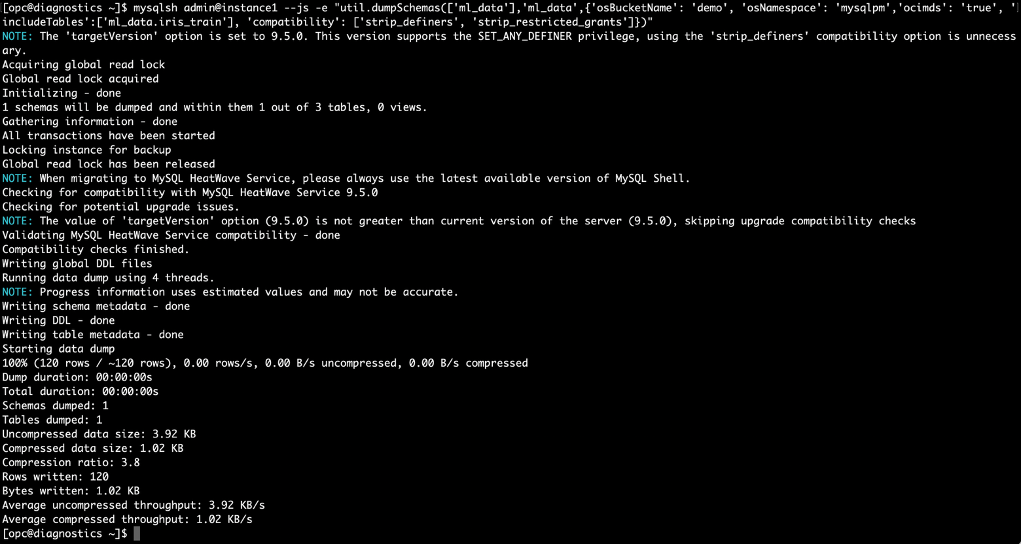
Fig-2. Export table iris_train using MySQL Shell dumpTables
- Instance2 is the interim instance running without HA which is used to run
ML_TRAIN. First, we export and copy tableiris_trainfrom instance1 to instance2 using table export/import from Object Storage.
Start instance2 using OCI Console, click on “database”, then “DB System”. Check “instance2”, click “Action”, and click “Start”
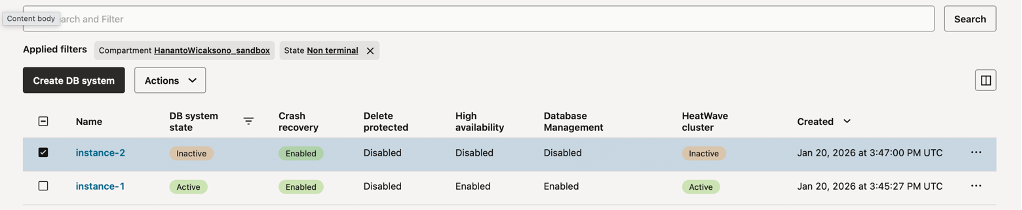
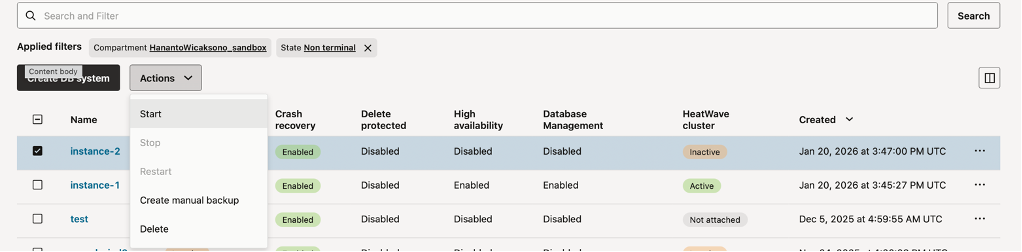
Fig-3. Starting Instance2 using OCI console
Import table iris_train from Object Storage bucket ‘demo’ using one-liner MySQL Shell
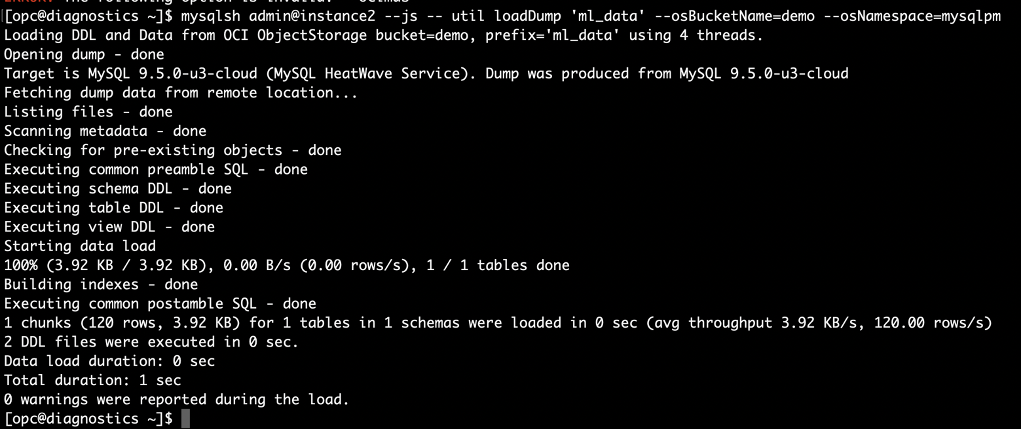
Fig-4. Import table iris_train into instance2 using MySQL Shell loadDump
Run ML_TRAIN with model handle name is “iris_model_handle”, exclude pseudo primary key column `my_row_id` using exclude_column_list.

Fig-5. Train the dataset using ML_TRAIN and exclude_column_list
Export ML model metadata tables to a user defined table using ML_MODEL_EXPORT, then export this table to Object Storage bucket ‘demo’
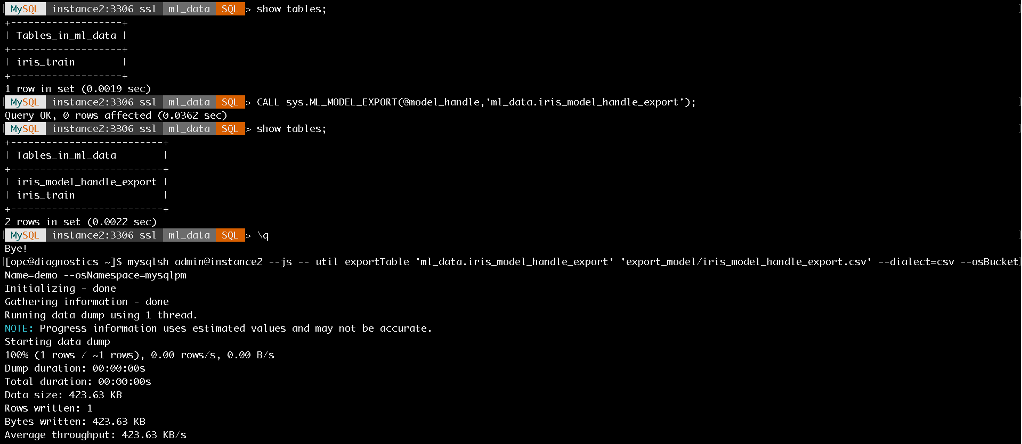
Fig-6. Export Model
Stop instance2 from OCI Console to optimise cost, click on “database”, then “DB System”. Check “instance2”, click “Action”, and click “Stop”
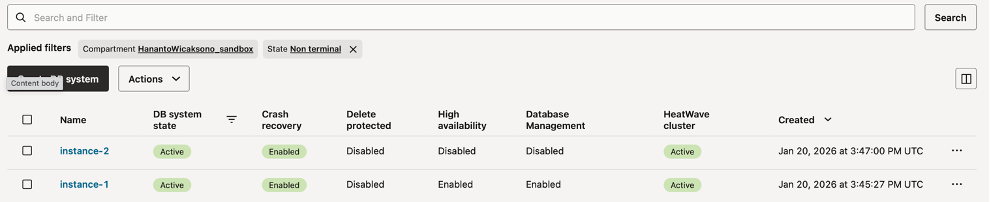
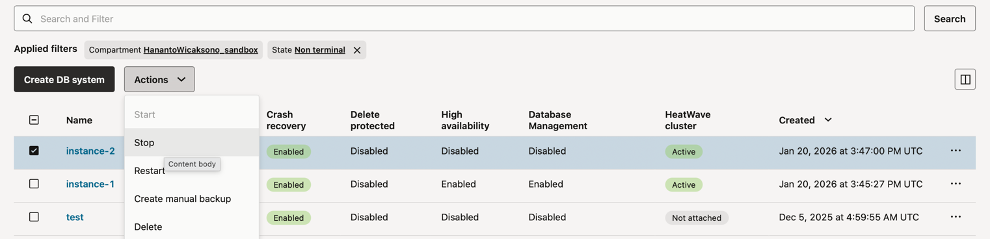
Fig-7. Stopping Instance2 using OCI console
- Back to instance1, import ML model from Object Storage bucket ‘demo’ into
ML_SCHEMA_<user>: Truncate and import table from Object Storage and Call ML_MODEL_IMPORT
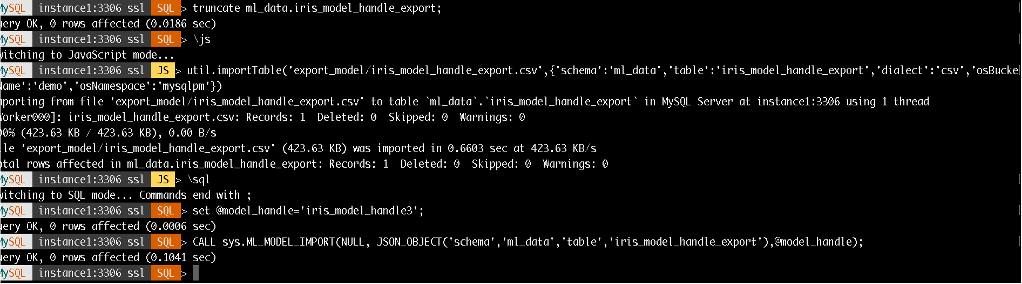
Fig-8. Import Model
At this stage, a trained ML model is available and can be executed repeatedly on instance1. Use ML_PREDICT_ROW to perform inference on the iris_test data.
If the test table includes explicit primary key columns, ML_PREDICT_TABLE can be used directly. However, if the table contains invisible or pseudo primary key columns (as in the example below), ML_PREDICT_ROW should be used instead, allowing the pseudo primary key column to be omitted during inference.
select `sepal length`, `sepal width`, `petal length`, `petal width`,
        sys.ML_PREDICT_ROW(JSON_OBJECT( "sepal length",`sepal length`,
             "sepal width", `sepal width`,
             "petal length", `petal length`,
             "petal width", `petal width`),
        @model_handle,NULL) prediction from iris_test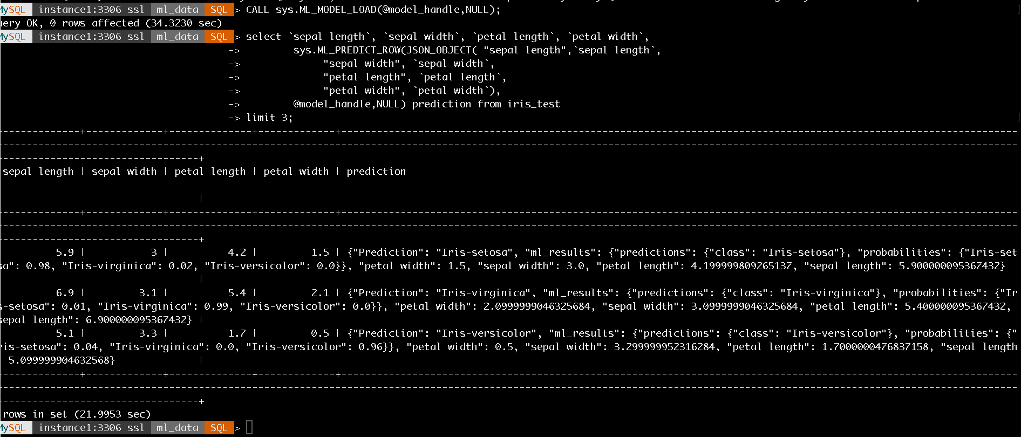
Fig-9. Inference within SQL query
Process Orchestration
Process orchestration may become essential to operationalising this mechanism, especially important for handling instance2 up/down events and coordinating data movement between production instance (instance1) and interim instance (instance2) used to run ML_TRAIN.
In OCI, workflow and process orchestration combine services such as Resource Manager, DevOps Pipelines, Events, Functions and many more. Instance up/down can be handled programmatically by executing command line such as OCI Python SDK or OCI CLI.
References:
- MySQL HeatWave AutoML: https://dev.mysql.com/doc/heatwave/en/mys-hwaml-features.html
- MySQL Shell Dump: https://dev.mysql.com/doc/mysql-shell/9.6/en/mysql-shell-utilities-dump-instance-schema.html
- MySQL Shell Load Dump: https://dev.mysql.com/doc/mysql-shell/9.6/en/mysql-shell-utilities-load-dump.html
- MySQL Shell Table Export: https://dev.mysql.com/doc/mysql-shell/9.6/en/mysql-shell-utilities-table-export.html
- MySQL Shell Parallel Import: https://dev.mysql.com/doc/mysql-shell/9.6/en/mysql-shell-utilities-parallel-table.html
- Start/Stop HeatWave using OCI CLI: https://blogs.oracle.com/mysql/start-and-stop-your-mysql-heatwave-instance-from-the-command-line-using-oracles-command-line-interface
- Start/Stop HeatWave using OCI CLI: https://blogs.oracle.com/mysql/start-and-stop-your-mysql-heatwave-instance-from-the-command-line-using-oracles-command-line-interface